
Page last updated: 29/04/2013
Inchware QOF prompts version 21.13.1
Released: 31/03/2012
- Implements QOF Business Rulesets (Version 21.0)
- Audit date 01/04/2013
- Expiry date 30/04/2013
- Required: 5-byte Read codes
- Full version history here
Available for:
Following systems automatically update:
- Pocket EMIS
- Pocket Ganymede 2.5 onwards
- Pocket Premiere 2.5 onwards
- Pocket Synergy 2.5 onwards
Coverage:
- Asthma
- Atrial Fibrillation
- Cancer
- Coronary Heart Disease (CHD)
- Chronic Obstructive Pulmonary Disease (COPD)
- CVD PP
- Dementia
- Depression
- Epilepsy
- Heart Failure
- Hypertension
- Learning Disabilities
- Mental Health
- Obesity
- Palliative Care
- Records
- Sexual Health
- Smoking
- Stroke
- Hypothyroidism
Pocket EMIS / Pocket Premiere 2.0 / Pocket Ganymede
- For EMIS LV/PCS and iSoft Ganymede / Premiere customers
To install:
- You can install the update from any workstation with access to the Inchware share
- The following process only needs to be performed only ONCE since the QOF data is stored on your server
- Ensure that Sinch is not active (synchronising) at any workstation
- Download the update:
- Save the downloaded file (InchQof-21.13.2.exe) to your Desktop
- If your clinical server name is CLINICAL
- Double-click InchQof-21.13.2.exe
- Click the 'Unzip' button
- Click the 'Close' button
- If your clinical server name is not CLINICAL please see instructions here
To update handhelds/laptops:
- Make sure that the QOF upgrade has been installed (see 'To install' above)
- Connect your handheld/laptop
- If Sinch is not set to start automatically, press 'Synchronise Now'
Version history
Release 21.13.1 31/03/2012 (RJP)- Audit date 01/04/2013
- Expiry date 30/04/2013
- QOF version 21.0 rules
- ruleversion = 21
- audityear = 2013
- revision = 1
- Changes for version 21 rulesets
- Changes for version 20 rulesets
- Changes for version 19 rulesets
- Audit date 01/04/2012
- Expiry date 30/04/2012
- QOF version 18.0 rules
- ruleversion = 18
- audityear = 2012
- revision = 1
- Codeset changes for version 18 rulesets
- Codeset changes for version 17 rulesets
- Audit date 01/04/2011
- Expiry date 30/04/2011
- QOF version 16.0 rules
- ruleversion = 16
- audityear = 2011
- revision = 2
- Changes for version 16 rulesets
- Audit date 01/04/2010
- Expiry date 30/04/2010
- QOF version 16.0 rules
- ruleversion = 16
- audityear = 2010
- revision = 1
- Changes for version 16 rulesets
- Audit date 01/04/2010
- Expiry date 30/04/2010
- QOF version 12.0 rules
- ruleversion = 12
- audityear = 2010
- revision = 2
- Corrections
- Depression - corrected patient selection criteria; must now have depression and diabetes code
- Audit date 01/04/2009
- Expiry date 30/04/2009
- Supported disease / monitoring categories:
- Asthma
- Atrial Fibrillation
- Cancer
- Coronary Heart Disease (CHD)
- Chronic Obstructive Pulmonary Disease (COPD)
- Dementia
- Depression
- Epilepsy
- Heart Failure
- Hypertension
- Learning Disabilities
- Mental Health
- Obesity
- Palliative Care
- Records
- Smoking
- Stroke
- Hypothyroidism
- Following indicators are not yet fully implemented:
- DEP 1: Inchware implementation currently omits DIAG_DAT test w.r.t REF_DAT
- SMOKING 1: Inchware implementation currently omits DIAG_DAT and tests instead NSMOK_DAT > 0 AND SMOK_DAT = 0
- SMOKING 2: Inchware implementation currently omits DIAG_DAT test w.r.t REF_DAT
- QOF version 11.0 rules
- ruleversion = 11
- audityear = 2009
- revision = 1
- Audit date 01/04/2008
- Expiry date 30/04/2008
- Supported disease / monitoring categories:
- Asthma
- Atrial Fibrillation
- Cancer
- Coronary Heart Disease (CHD)
- Chronic Obstructive Pulmonary Disease (COPD)
- Dementia
- Depression
- Epilepsy
- Heart Failure
- Hypertension
- Learning Disabilities
- Mental Health
- Obesity
- Palliative Care
- Records
- Smoking
- Stroke
- Hypothyroidism
- Following indicators are not yet fully implemented:
- DEP 1: Inchware implementation currently omits DIAG_DAT test w.r.t REF_DAT
- SMOKING 1: Inchware implementation currently omits DIAG_DAT and tests instead NSMOK_DAT > 0 AND SMOK_DAT = 0
- SMOKING 2: Inchware implementation currently omits DIAG_DAT test w.r.t REF_DAT
- QOF version 10.0 rules
- ruleversion = 10
- audityear = 2008
- revision = 1
- As 8.8.2 but with audit year end = 01/04/2008, expiry 01/11/2007
- As 8.7.2 but with audit year end = 01/04/2008
- First implementation with QOF version 8.5 rules
- ruleversion = 8
- audityear = 2007
- revision = 0
- Following indicators are not yet fully implemented:
- DEP 1: Inchware implementation currently omits DIAG_DAT test w.r.t REF_DAT
- SMOKING 1: Inchware implementation currently omits DIAG_DAT and tests instead NSMOK_DAT > 0 AND SMOK_DAT = 0
- SMOKING 2: Inchware implementation currently omits DIAG_DAT test w.r.t REF_DAT
- Supported disease / monitoring categories:
- Asthma
- Atrial Fibrillation
- Cancer
- Coronary Heart Disease (CHD)
- Chronic Obstructive Pulmonary Disease (COPD)
- Dementia
- Depression
- Epilepsy
- Heart Failure
- Hypertension
- Mental Health
- Records
- Smoking
- Stroke
- Hypothyroidism
- Audit date 01/04/2007
- Re-built with expiry date 01/01/2007
- Re-built with expiry date 31/08/2006
- Re-built with audit date 01/04/2007
- New version numbering scheme: ruleversion.audityear.revision
- ruleversion = 7
- audityear = (200)7
- revision = 0
- Smoking: Corrected diagnosis code ranges (CESS_COD)
- ASTHMA: Corrected diagnosis code ranges (AST_COD)
- COPD: Corrected diagnosis code ranges (COPD_COD)
- Codes: Minor corrections to STRT_COD, BP_COD, AST_COD
- Revised all rules according to Version 7.0 of the QOF Business Rulesets
- Functional changes:
- Indicators where patient not in denominator now tagged 'Exempt'
- Indicators where patient in denominator but not numerator now tagged 'N/A'
- Many Read code ranges revised - please see DoH specification
- Rule changes:
- CHD9: Salicylates, warfarin, clopidogrel now within 15m prior to audit (was 6)
- COPD2: New spirometry exception codes added
- COPD3: New spirometry exception codes added
- COPD7: Inhaler technique check now within 27m prior to audit (was 24m)
- MH (all): 'Stopped lithium' (665B) now removes the patient from MH
- MH3: Removed 'stopped lithium' exception code (665B)
- MH4: Removed 'stopped lithium' exception code (665B)
- MH5 i: Serum lithium Therapeutic range now 0.4-1.0 (was 0.6-1.0)
- MH5 ii: Removed 'stopped lithium' exception code (665B)
- STROKE9: Salicylates, warfarin, clopidogrel now within 15m prior to audit (was 6)
- Corrections:
- MH (all): Corrected selection criteria
- STROKE (all): Corrected selection criteria - use earliest code, not latest
- Preview of Version 7.0 rulesets, see 0.9.1 above for details
- Last release with QOF Business Rulesets Version 5.0, 27 September 2004
- COPD7: Corrected messaging where no treatment within 6m of audit
- All: Read codes now shown in (brackets) after all terms
- Default audit date (REF_DAT) now 01/04/2006
- COPD7: Inhaler technique not checked now raises Action message (was Info)
- MH4: Corrected messaging for serum creatinine
- MH5, DM6, DM7: Corrected processing of numerics
- MH5: Corrected messaging w.r.t. audit date (9m not 3m)
- All: For several codes with same date, LATEST now selects the last (previously first)
Installation on server other than CLINICAL
- Double-click InchQof-16.10.1.exe:
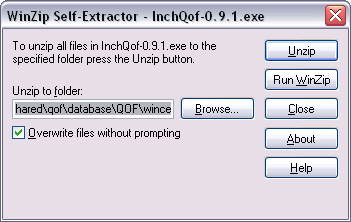
- Press the LEFT cursor key to go to the start of the 'Unzip to folder' box, then select the word CLINICAL (ensuring that the leading '\\' is not selected):
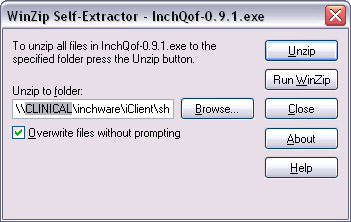
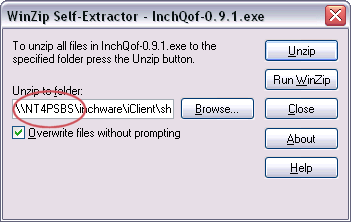
- Replace the word 'clinical' with your server name e.g. for NT4PSBS:
- Click the 'Unzip' button
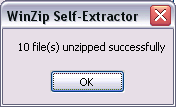
- Click the 'OK' button
- Click the 'Close' button